
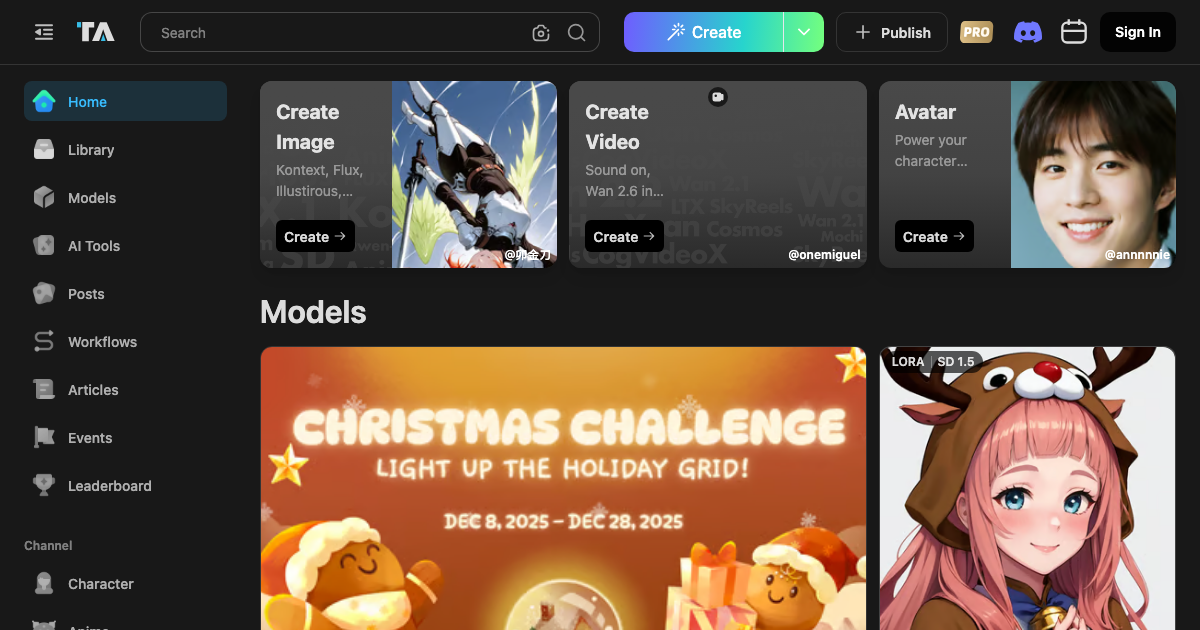
Tensor.Art is a FREE online platform for AI image generation and model hosting. It provides users with the tools to create images, videos, and train models without cost. It functions as an AI model sharing platform where users can upload and download various models, including Checkpoint, Embedding, ControlNet, LoRA, Pony, LoCon, and LyCORIS. The platform supports base models like Stable Diffusion 1.5, SDXL, Hunyuan-DiT, Wan, FLUX, and VACE.
Tensor.Art Key Features
AI Image Generation
Generate high-quality images using various AI models and customizable parameters. Supports text-to-image and image-to-image generation.
Model Hosting
Upload, share, and download AI models, including Checkpoints, Embeddings, ControlNets, LoRAs, and more.
Workflow Templates
Access and utilize pre-designed workflow templates to streamline the image generation process. Allows customization and sharing of workflows.
Community Sharing
Share creations, models, and workflows with a vibrant community of AI artists and developers. Discover new techniques and inspiration.
Training Resources
Access tutorials and guides for training AI models, including LoRA and other advanced techniques.
Base Model Support
Utilize popular base models such as Stable Diffusion 1.5, SDXL, Hunyuan-DiT, Wan, FLUX, and VACE for diverse image generation capabilities.
Prompting Guides and Articles
Access a library of prompting guides, tutorials, and articles to improve the quality of generated images and explore new creative possibilities.
How Tensor.Art Works
Tensor.Art provides a user-friendly interface for creating images using AI models. Users input prompts, select models, adjust parameters, and generate images. The platform also facilitates sharing and downloading models and workflows from the community.
Tensor.Art Benefits
Cost Efficiency
Provides free access to AI image generation and model hosting, reducing the costs associated with expensive software and hardware.
Creative Control
Offers extensive customization options and model support, allowing users to fine-tune their creations and achieve desired results.
Community Collaboration
Fosters a collaborative environment where users can share, learn, and inspire each other, leading to innovation and creativity.
Accessibility
Offers a web-based platform accessible from any device with an internet connection, making AI image generation available to a broader audience.
Learning Resources
Provides tutorials and guides for training AI models and improving prompting skills, empowering users to enhance their expertise.
Time Savings
Streamlines the image generation process with workflow templates and pre-trained models, reducing the time required to create high-quality visuals.
Tensor.Art Use Cases
Digital Art
Creating unique and personalized digital artwork for personal or commercial use.
Content Creation
Generating visuals for blog posts, social media, and marketing materials.
Game Development
Creating textures, concept art, and promotional images for video games.
Model Prototyping
Testing and refining AI models for various applications.
Tensor.Art FAQs
Is Tensor.Art really free?
Yes, Tensor.Art provides free access to its core features, including image generation and model hosting.
What models are supported?
Tensor.Art supports various models, including Checkpoint, Embedding, ControlNet, LoRA, Pony, LoCon, and LyCORIS.
Can I share my creations with the community?
Yes, you can share your images, models, and workflows with the Tensor.Art community.
Who Should Use Tensor.Art
Tensor.Art is ideal for digital artists, content creators, game developers, AI enthusiasts, and anyone looking to explore the world of AI image generation and model hosting. It is perfect for both beginners and experienced users who want to create stunning visuals without cost.


